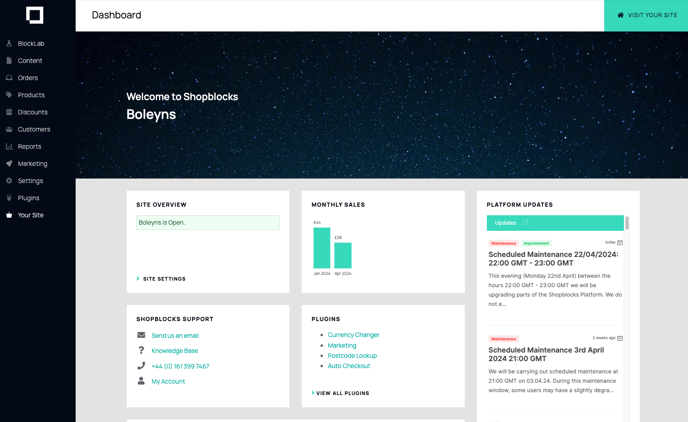
What is the Symphony Dashboard?
The Symphony Dashboard is the first screen you see after logging in. It displays recent activity from the Symphony news feed and provides quick links to every section of the platform.
Main menu
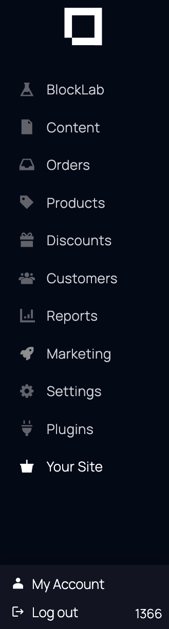
The main menu is located on the left side of your screen and provides access to every section of the Symphony platform. Each section is described below.
What is BlockLab?
BlockLab lists all your BlockLab pages. Click any page to open and edit it.

Content
This section is where you can add content to your site, including pages, menus, blog posts, and your return policy. The remaining content on your site will be automatically populated based on your products, customers, and orders.

Orders
Create, view, and manage your orders here, including tracking order status and processing refunds.

Products
Manage your products and categories here, including adding new items, editing details, and organising your catalogue.

Discounts
Set up and manage discount codes, promotional offers, and sale pricing for your shop.

Customers
All the information for your customers is held in here, including the ability to help a customer reset their password.

Reports
Build and export reports covering sales, orders, and customer activity to monitor your store's performance.

Settings
In the settings section, you have the power to customise your Symphony experience. Here, you can manage crucial aspects such as payment details, user settings, and tracking preferences.

Plugins
Here you can browse a range of plugins to enhance your website, or integrate with third party systems.
Your Site
This will take you to the front end of your website. See what your website visitors see.

My Account
This section allows you to manage your subscription, view invoices from Symphony, and update your billing information.
Log Out
Click here when you’re ready to end your Symphony session.