
What the address types mean
-
Delivery – This address can only be used for delivery. It will appear in the delivery step at checkout.
-
Billing – This address can only be used for billing. It will appear in the billing step at checkout.
-
Any – This address can be used for both delivery and billing. If you use it as your delivery address, you can tick “My billing address is the same as my delivery address” to reuse it on the billing step.
Adding an address with a type
To add a new address and set its type:
-
Go to My Account → Addresses and click Add Address.
-
Enter the address details in the form.
-
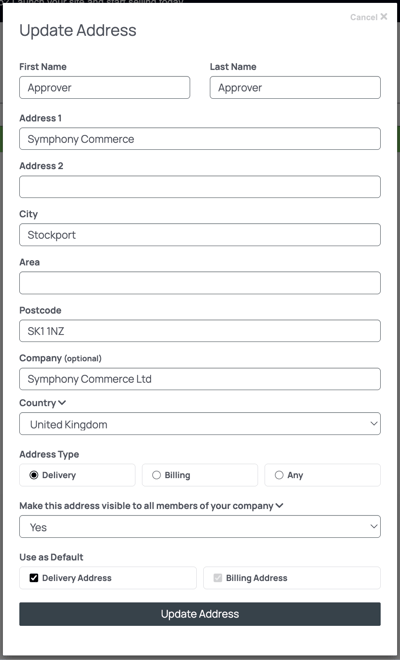
Under Address Type, choose Delivery, Billing or Any. This sets how the address will be available during checkout.
-
Decide whether the address should be visible only to you or shared with your company. If you select Yes to “Make this address visible to all members of your company”, everyone in your company can use it at checkout; otherwise it is personal to you. (PLEASE NOTE: This feature is available for Business Customers users only). Learn More
-
(Optional) Tick Use as default delivery address or Use as default billing address if you want this address pre‑selected for future orders.
Using addresses at checkout
When you go through checkout, the system filters your addresses based on their type:
-
On the delivery step you will see addresses marked Delivery or Any. These are the addresses you can ship to.
-
On the billing step you will see addresses marked Billing or Any. These are used for invoices. If you selected an Any address for delivery, you can choose to use it for billing too by checking “My billing address is the same as my delivery address”.
If you select a Delivery‑only address for your delivery, you must choose a separate billing address; the option to use the same address will be disabled on the billing step. Likewise, Billing‑only addresses are not available for delivery.