---
title: How do I notify my customers when a product is back in stock?
description: "Out Of Stock Notify: a powerful tool to boost e-commerce sales"
---
[Skip to content](https://resources.symphonycommerce.io/knowledge-base/how-do-i-notify-my-customers-when-a-product-is-back-in-stock#main-content)
[File a Ticket](https://resources.symphonycommerce.io/knowledge-base/kb-tickets/new?hsLang=en) [Go to Customer Portal](https://clienthub.symphonycommerce.io/tickets-view?hsLang=en)
[](https://resources.symphonycommerce.io/knowledge-base?hsLang=en)
- [WHY SYMPHONY?](https://www.symphonycommerce.io/pages/why-shopblocks)
Show submenu for WHY SYMPHONY?
- [EXCLUSIVELY B2B ECOMMERCE](https://www.symphonycommerce.io/pages/why-shopblocks#exclusivelyB2B)
- [LIMITLESS INTEGRATION](https://www.symphonycommerce.io/pages/why-shopblocks#ftv)
- [FASTEST TIME TO VALUE](https://www.symphonycommerce.io/pages/why-shopblocks#limitlessIntegration)
- [SEAMLESS MIGRATION](https://www.symphonycommerce.io/pages/why-shopblocks#seamlessMigration)
- [CUSTOMER SUCCESS](https://www.symphonycommerce.io/pages/customer-success)
Show submenu for CUSTOMER SUCCESS
- [CASE STUDIES](https://www.symphonycommerce.io/pages/case-studies)
- [FEATURES](https://www.symphonycommerce.io/pages/features-in-focus)
Show submenu for FEATURES
- [NEXUS – WHITE LABEL STOREFRONT PLATFORM](https://www.symphonycommerce.io/pages/nexus)
- [INTEGRATIONS](https://www.symphonycommerce.io/pages/api-integrations-to-power-up-your-ecommerce)
- [FORTIS – SMARTER DISCOUNTS FOR BIGGER B2B DEALS](https://www.symphonycommerce.io/pages/fortis)
- [SYMPHONY PAY – TRUSTED PAYMENT OPTIONS FOR MODERN B2B COMMERCE](https://www.symphonycommerce.io/pages/symphony-pay)
- [PRICING](https://www.symphonycommerce.io/pages/pricing)
- [PARTNERSHIPS](https://www.symphonycommerce.io/pages/ensemble)
- [INSIGHTS HUB](https://resources.symphonycommerce.io/blog)
Open main navigation
Close main navigation
- [WHY SYMPHONY?](https://www.symphonycommerce.io/pages/why-shopblocks)
Show submenu for WHY SYMPHONY?
- [EXCLUSIVELY B2B ECOMMERCE](https://www.symphonycommerce.io/pages/why-shopblocks#exclusivelyB2B)
- [LIMITLESS INTEGRATION](https://www.symphonycommerce.io/pages/why-shopblocks#ftv)
- [FASTEST TIME TO VALUE](https://www.symphonycommerce.io/pages/why-shopblocks#limitlessIntegration)
- [SEAMLESS MIGRATION](https://www.symphonycommerce.io/pages/why-shopblocks#seamlessMigration)
- [CUSTOMER SUCCESS](https://www.symphonycommerce.io/pages/customer-success)
Show submenu for CUSTOMER SUCCESS
- [CASE STUDIES](https://www.symphonycommerce.io/pages/case-studies)
- [FEATURES](https://www.symphonycommerce.io/pages/features-in-focus)
Show submenu for FEATURES
- [NEXUS – WHITE LABEL STOREFRONT PLATFORM](https://www.symphonycommerce.io/pages/nexus)
- [INTEGRATIONS](https://www.symphonycommerce.io/pages/api-integrations-to-power-up-your-ecommerce)
- [FORTIS – SMARTER DISCOUNTS FOR BIGGER B2B DEALS](https://www.symphonycommerce.io/pages/fortis)
- [SYMPHONY PAY – TRUSTED PAYMENT OPTIONS FOR MODERN B2B COMMERCE](https://www.symphonycommerce.io/pages/symphony-pay)
- [PRICING](https://www.symphonycommerce.io/pages/pricing)
- [PARTNERSHIPS](https://www.symphonycommerce.io/pages/ensemble)
- [INSIGHTS HUB](https://resources.symphonycommerce.io/blog)
- [File a Ticket](https://resources.symphonycommerce.io/knowledge-base/kb-tickets/new)
- [Go to Customer Portal](https://clienthub.symphonycommerce.io/tickets-view)
- [VISIT OUR WEBSITE](https://www.symphonycommerce.io/)
[VISIT OUR WEBSITE](https://www.symphonycommerce.io/)
How can we help you?
- There are no suggestions because the search field is empty.
1. [Symphony Knowledge Base](https://resources.symphonycommerce.io/knowledge-base?hsLang=en)
2. [Plugins](https://resources.symphonycommerce.io/knowledge-base/plugins?hsLang=en)
3. [Out Of Stock Notify](https://resources.symphonycommerce.io/knowledge-base/plugins?hsLang=en#out-of-stock-notify)
# How do I notify my customers when a product is back in stock?
## Out Of Stock Notify: a powerful tool to boost e-commerce sales
The Out Of Stock Notify feature is a must-have marketing tool for ecommerce websites. It automatically emails customers who have expressed interest in out-of-stock products once they become available again, helping you capture potential sales that might otherwise be lost.
#### Solving a common ecommerce challenge
When customers find that a product they want is out of stock, they often look elsewhere, leading to lost sales. Even if the product is exclusive, manually tracking and notifying customers when it's back in stock is time-consuming and inefficient. Out Of Stock Notify automates this process, ensuring customers are informed promptly, thus increasing the chances of securing the sale.
### Installing the Out Of Stock Notify plugin
**1. Installing the Plugin:**
- Go to **Plugins**.

- Click on **See All Plugins** at the top right of the page.

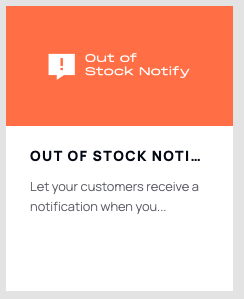
- Find the **Out Of Stock Notify.
**
**2. Configuring Notification Settings:**
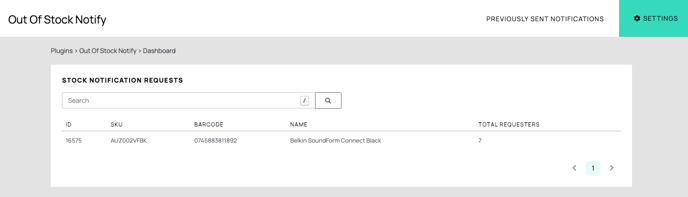
- Access the plugin’s **settings** at the top right of the plugin's dashboard to customise how notifications are sent:

- Use the Stock Multiplier setting to control the number of customers who receive an email when a product is restocked.
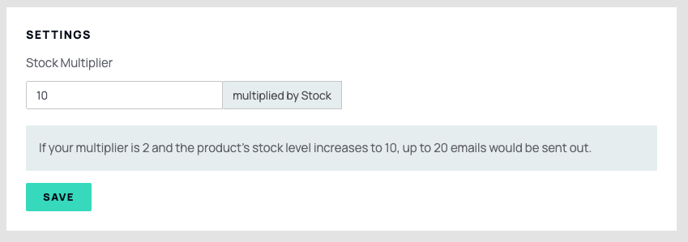
For example, if you have 1,000 customers waiting for a product and only 100 units are back in stock, you might want to notify a fraction of those customers to avoid disappointment.
**3. Adding the Email Input Field to your website:**
- To collect customers' email addresses, you'll need to add a special block to your product page design. This is achieved in BlockLab.
- Go to BlockLab in your Symphony admin, add the **Out Of Stock Notify block** to your product page design, and then publish the changes. This block will be visible on all product pages where items are out of stock.

**4. Testing the feature on your website:**
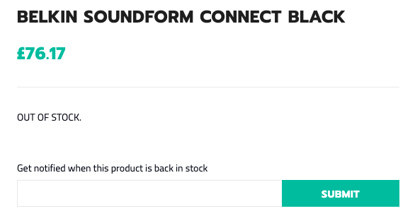
- Visit your website’s front-end to ensure the new block is displaying correctly on out of stock product pages. As a customer, you should see the option to enter an email address to receive a notification once the product is back in stock.
**5. Managing Customer Sign-Ups:**
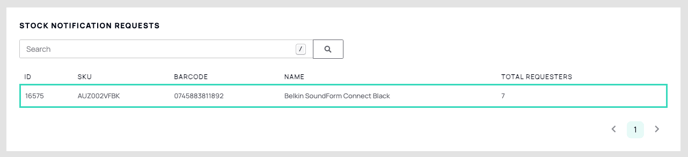
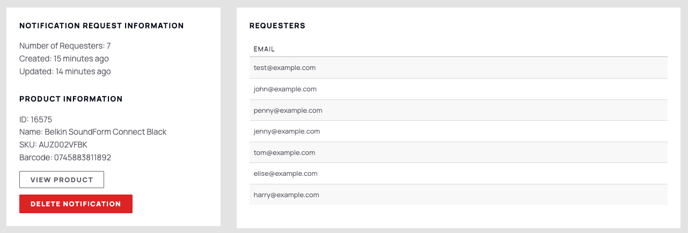
- After customers start signing up, return to the plugin dashboard in your Symphony admin to view the list of customers awaiting notifications. This list will grow as more customers sign up.
**6. Automating Notifications:**
- The true power of Out Of Stock Notify lies in its automation. When you update a product’s stock level in your Symphony admin, the system **automatically** sends an email notification to all the relevant customers. No manual intervention is required.
Benefits of using Out Of Stock Notify
- **Increased Sales**: Customers who have already shown interest in a product are more likely to complete a purchase when notified that it’s back in stock.
- **Improved Customer Retention:** By keeping customers informed, you reduce the chance of them looking elsewhere, fostering brand loyalty.
- **Higher Customer Lifetime Value**: By efficiently managing stock notifications, you encourage repeat purchases, enhancing the overall value of your customer base.
Implementing the Out Of Stock Notify feature on your ecommerce website not only simplifies the restocking process but also ensures that customers are kept engaged, leading to more successful sales and a better shopping experience.
- [Getting started](https://resources.symphonycommerce.io/knowledge-base/getting-started?hsLang=en)
- [Settings](https://resources.symphonycommerce.io/knowledge-base/settings?hsLang=en#main-content)
- [Payment Methods](https://resources.symphonycommerce.io/knowledge-base/settings?hsLang=en#payment-methods)
- [Redirects](https://resources.symphonycommerce.io/knowledge-base/settings?hsLang=en#redirects)
- [Deliveries](https://resources.symphonycommerce.io/knowledge-base/settings?hsLang=en#deliveries)
- [Notifications And Emails](https://resources.symphonycommerce.io/knowledge-base/settings?hsLang=en#notifications-and-emails)
- [Users](https://resources.symphonycommerce.io/knowledge-base/settings?hsLang=en#users)
- [Site Settings](https://resources.symphonycommerce.io/knowledge-base/settings?hsLang=en#site-settings)
- [Varnish Cache](https://resources.symphonycommerce.io/knowledge-base/settings?hsLang=en#varnish-cache)
- [Tracking, SEO And Javascript](https://resources.symphonycommerce.io/knowledge-base/settings?hsLang=en#tracking-seo-and-javascript)
- [Reports](https://resources.symphonycommerce.io/knowledge-base/reports?hsLang=en)
- [BlockLab](https://resources.symphonycommerce.io/knowledge-base/blocklab?hsLang=en)
- [Content](https://resources.symphonycommerce.io/knowledge-base/content?hsLang=en#main-content)
- [Pages](https://resources.symphonycommerce.io/knowledge-base/content?hsLang=en#pages)
- [Menus](https://resources.symphonycommerce.io/knowledge-base/content?hsLang=en#menus)
- [Strings](https://resources.symphonycommerce.io/knowledge-base/content?hsLang=en#strings)
- [Blogs / News](https://resources.symphonycommerce.io/knowledge-base/content?hsLang=en#blogs-news)
- [Snippets](https://resources.symphonycommerce.io/knowledge-base/content?hsLang=en#snippets)
- [Forms](https://resources.symphonycommerce.io/knowledge-base/content?hsLang=en#forms)
- [Downloads](https://resources.symphonycommerce.io/knowledge-base/content?hsLang=en#downloads)
- [Products](https://resources.symphonycommerce.io/knowledge-base/products?hsLang=en#main-content)
- [Groups](https://resources.symphonycommerce.io/knowledge-base/products?hsLang=en#groups)
- [Categories](https://resources.symphonycommerce.io/knowledge-base/products?hsLang=en#categories)
- [Brands](https://resources.symphonycommerce.io/knowledge-base/products?hsLang=en#brands)
- [Reviews](https://resources.symphonycommerce.io/knowledge-base/products?hsLang=en#reviews)
- [Products](https://resources.symphonycommerce.io/knowledge-base/products?hsLang=en#products)
- [Stock](https://resources.symphonycommerce.io/knowledge-base/products?hsLang=en#stock)
- [Catalogues](https://resources.symphonycommerce.io/knowledge-base/products?hsLang=en#catalogues)
- [Customisations](https://resources.symphonycommerce.io/knowledge-base/products?hsLang=en#customisations)
- [Discounts](https://resources.symphonycommerce.io/knowledge-base/discounts?hsLang=en#main-content)
- [Discounts Fortis](https://resources.symphonycommerce.io/knowledge-base/discounts?hsLang=en#discounts-fortis)
- [Plugins](https://resources.symphonycommerce.io/knowledge-base/plugins?hsLang=en#main-content)
- [Google Shopping Feed](https://resources.symphonycommerce.io/knowledge-base/plugins?hsLang=en#google-shopping-feed)
- [One-Time Passcode](https://resources.symphonycommerce.io/knowledge-base/plugins?hsLang=en#one-time-passcode)
- [Out Of Stock Notify](https://resources.symphonycommerce.io/knowledge-base/plugins?hsLang=en#out-of-stock-notify)
- [Auto Tags](https://resources.symphonycommerce.io/knowledge-base/plugins?hsLang=en#auto-tags)
- [Compare Products](https://resources.symphonycommerce.io/knowledge-base/plugins?hsLang=en#compare-products)
- [Business Customers](https://resources.symphonycommerce.io/knowledge-base/plugins?hsLang=en#business-customers)
- [Stickers](https://resources.symphonycommerce.io/knowledge-base/plugins?hsLang=en#stickers)
- [Custom Fields](https://resources.symphonycommerce.io/knowledge-base/plugins?hsLang=en#custom-fields)
- [B2B Sales](https://resources.symphonycommerce.io/knowledge-base/plugins?hsLang=en#b2b-sales)
- [Auto Checkout](https://resources.symphonycommerce.io/knowledge-base/plugins?hsLang=en#auto-checkout)
- [Tempus](https://resources.symphonycommerce.io/knowledge-base/plugins?hsLang=en#tempus)
- [Orders](https://resources.symphonycommerce.io/knowledge-base/orders?hsLang=en#main-content)
- [Returns](https://resources.symphonycommerce.io/knowledge-base/orders?hsLang=en#returns)
- [Customers](https://resources.symphonycommerce.io/knowledge-base/customers?hsLang=en)
- [My Account](https://resources.symphonycommerce.io/knowledge-base/my-account?hsLang=en)
- [Marketing](https://resources.symphonycommerce.io/knowledge-base/marketing?hsLang=en#main-content)
- [Merchandising](https://resources.symphonycommerce.io/knowledge-base/marketing?hsLang=en#merchandising)
- [Email](https://resources.symphonycommerce.io/knowledge-base/marketing?hsLang=en#email)
[](http://www.symphonycommerce.io)
1 St Peter's Square
Stockport, SK1 1NZ
[support@symphonycommerce.io](mailto:support@symphonycommerce.io)
[(+44)161 399 7467](tel:01613997467)
Copyright © 2026, Symphony Commerce