---
title: How do I create a Simple Discount?
description: Creating discounts is easy and can be done in just a few steps. Follow our simple guide to set up a Simple Discount and ensure it works seamlessly.
---
[Skip to content](https://resources.symphonycommerce.io/knowledge-base/how-do-i-create-a-simple-discount#main-content)
[File a Ticket](https://resources.symphonycommerce.io/knowledge-base/kb-tickets/new?hsLang=en) [Go to Customer Portal](https://clienthub.symphonycommerce.io/tickets-view?hsLang=en)
[](https://resources.symphonycommerce.io/knowledge-base?hsLang=en)
- [WHY SYMPHONY?](https://www.symphonycommerce.io/pages/why-shopblocks)
Show submenu for WHY SYMPHONY?
- [EXCLUSIVELY B2B ECOMMERCE](https://www.symphonycommerce.io/pages/why-shopblocks#exclusivelyB2B)
- [LIMITLESS INTEGRATION](https://www.symphonycommerce.io/pages/why-shopblocks#ftv)
- [FASTEST TIME TO VALUE](https://www.symphonycommerce.io/pages/why-shopblocks#limitlessIntegration)
- [SEAMLESS MIGRATION](https://www.symphonycommerce.io/pages/why-shopblocks#seamlessMigration)
- [CUSTOMER SUCCESS](https://www.symphonycommerce.io/pages/customer-success)
Show submenu for CUSTOMER SUCCESS
- [CASE STUDIES](https://www.symphonycommerce.io/pages/case-studies)
- [FEATURES](https://www.symphonycommerce.io/pages/features-in-focus)
Show submenu for FEATURES
- [NEXUS – WHITE LABEL STOREFRONT PLATFORM](https://www.symphonycommerce.io/pages/nexus)
- [INTEGRATIONS](https://www.symphonycommerce.io/pages/api-integrations-to-power-up-your-ecommerce)
- [FORTIS – SMARTER DISCOUNTS FOR BIGGER B2B DEALS](https://www.symphonycommerce.io/pages/fortis)
- [SYMPHONY PAY – TRUSTED PAYMENT OPTIONS FOR MODERN B2B COMMERCE](https://www.symphonycommerce.io/pages/symphony-pay)
- [PRICING](https://www.symphonycommerce.io/pages/pricing)
- [PARTNERSHIPS](https://www.symphonycommerce.io/pages/ensemble)
- [INSIGHTS HUB](https://resources.symphonycommerce.io/blog)
Open main navigation
Close main navigation
- [WHY SYMPHONY?](https://www.symphonycommerce.io/pages/why-shopblocks)
Show submenu for WHY SYMPHONY?
- [EXCLUSIVELY B2B ECOMMERCE](https://www.symphonycommerce.io/pages/why-shopblocks#exclusivelyB2B)
- [LIMITLESS INTEGRATION](https://www.symphonycommerce.io/pages/why-shopblocks#ftv)
- [FASTEST TIME TO VALUE](https://www.symphonycommerce.io/pages/why-shopblocks#limitlessIntegration)
- [SEAMLESS MIGRATION](https://www.symphonycommerce.io/pages/why-shopblocks#seamlessMigration)
- [CUSTOMER SUCCESS](https://www.symphonycommerce.io/pages/customer-success)
Show submenu for CUSTOMER SUCCESS
- [CASE STUDIES](https://www.symphonycommerce.io/pages/case-studies)
- [FEATURES](https://www.symphonycommerce.io/pages/features-in-focus)
Show submenu for FEATURES
- [NEXUS – WHITE LABEL STOREFRONT PLATFORM](https://www.symphonycommerce.io/pages/nexus)
- [INTEGRATIONS](https://www.symphonycommerce.io/pages/api-integrations-to-power-up-your-ecommerce)
- [FORTIS – SMARTER DISCOUNTS FOR BIGGER B2B DEALS](https://www.symphonycommerce.io/pages/fortis)
- [SYMPHONY PAY – TRUSTED PAYMENT OPTIONS FOR MODERN B2B COMMERCE](https://www.symphonycommerce.io/pages/symphony-pay)
- [PRICING](https://www.symphonycommerce.io/pages/pricing)
- [PARTNERSHIPS](https://www.symphonycommerce.io/pages/ensemble)
- [INSIGHTS HUB](https://resources.symphonycommerce.io/blog)
- [File a Ticket](https://resources.symphonycommerce.io/knowledge-base/kb-tickets/new)
- [Go to Customer Portal](https://clienthub.symphonycommerce.io/tickets-view)
- [VISIT OUR WEBSITE](https://www.symphonycommerce.io/)
[VISIT OUR WEBSITE](https://www.symphonycommerce.io/)
How can we help you?
- There are no suggestions because the search field is empty.
1. [Symphony Knowledge Base](https://resources.symphonycommerce.io/knowledge-base?hsLang=en)
2. [Discounts](https://resources.symphonycommerce.io/knowledge-base/discounts?hsLang=en)
3. [Discounts Fortis](https://resources.symphonycommerce.io/knowledge-base/discounts?hsLang=en#discounts-fortis)
# How do I create a Simple Discount?
## Creating discounts is easy and can be done in just a few steps. Follow the guide below to set up a Simple Discount and ensure it works seamlessly.
1\. Navigate to your Admin System and go to **Discounts**, found in the main menu.
2\. Click on **Add Discount** in the top right hand corner.
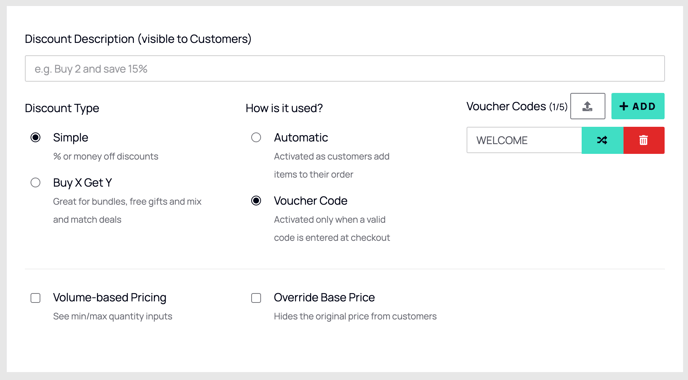
3\. Choose a **Description** for your discount. 
4\. **Select Discount Type**
- Under **Discount Type**, select **Simple**.
- Simple Discounts allow you to apply percentage-based or fixed discounts on specific products.

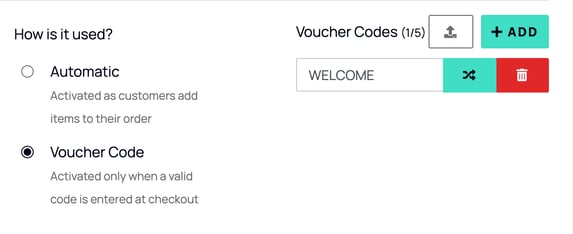
5\. Choose How It’s Used
- **Automatic**: The discount applies automatically as customers add items to their order.
- **Voucher Code**: Customers must enter a **Voucher Code** at checkout to receive the discount.
- If you choose **Voucher Code**, you can:
- Manually enter a single, or multiple voucher codes (Up to 5 if it's done manually).
- Generate a random code.
- Bulk upload multiple voucher codes.
### 
6\. **Match Products**
You can match products to apply the discount by selecting from the following criteria:
- **Barcode**
- **Brands**
- **Category**
- **Name**
- **Tags**
- **SKU**
- **Entire Basket**
- **Any Product**
- **Delivery Option**
- **Any Delivery Option**
- **Rules (JSON Logic)**
> **Tip**: Use **Rules** (JSON Logic) for more complex, customisable rules. For example, combining specific conditions like excluding categories or products on sale.

7\. **Find and Add Products**
- Search and select the product(s) or groups of products you want the discount to apply to.
- You can add more than one product per line **if they share the same discount setup**.

8\. **Set the Discount Details**:
- **Discount Type**: Choose the type of discount:
- **% Off** (Percentage discount).
- **Money Off** (Whole Bundle or Per Unit).
- **New Fixed Price** (Whole Bundle or Per Unit).

- **Value**: Enter the value of the discount (e.g., 10% or £5).

- **QTY**: Set the quantity of items a customer must purchase to qualify for the discount. (Leave empty for if a minimum is not required)

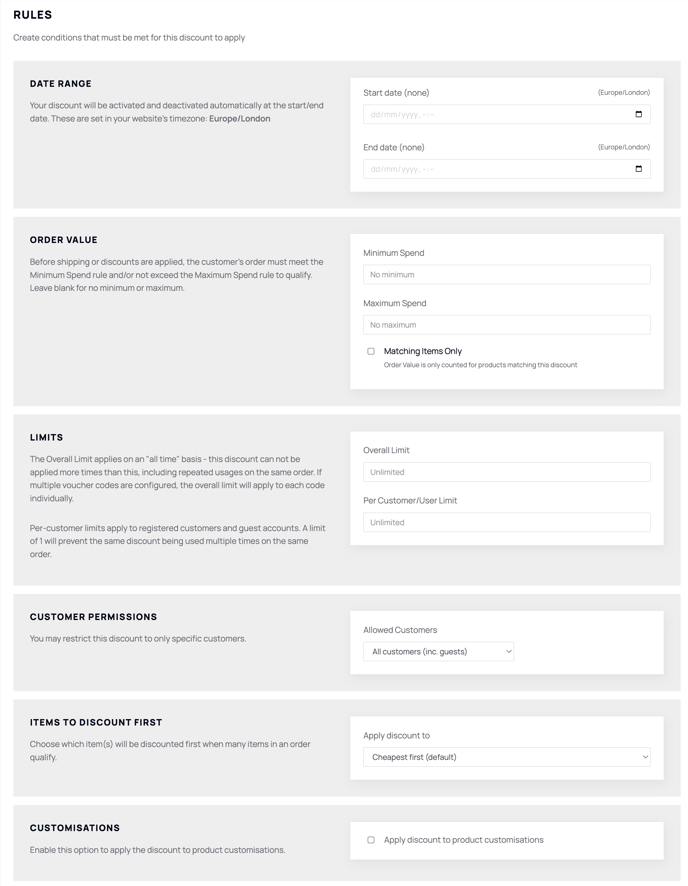
9\. **Add Rules (Optional)**
You can configure **Advanced Rules** to add conditions for your discount.
- Example: Set a minimum/maximum spend, a date range, limits and more!
- Refer to the article **[How to Manage Discount Rules](https://resources.shopblocks.com/knowledge-base/how-do-i-manage-discounts-rules?hsLang=en)** for a step-by-step guide on creating and managing rules.
10\. **Save and Activate**
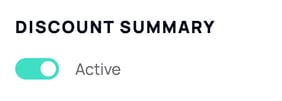
- Toggle the discount to **Active** to make it available for customers.
- Once all the details are configured, click **SAVE** at the top-right corner.

- [Getting started](https://resources.symphonycommerce.io/knowledge-base/getting-started?hsLang=en)
- [Settings](https://resources.symphonycommerce.io/knowledge-base/settings?hsLang=en#main-content)
- [Payment Methods](https://resources.symphonycommerce.io/knowledge-base/settings?hsLang=en#payment-methods)
- [Redirects](https://resources.symphonycommerce.io/knowledge-base/settings?hsLang=en#redirects)
- [Deliveries](https://resources.symphonycommerce.io/knowledge-base/settings?hsLang=en#deliveries)
- [Notifications And Emails](https://resources.symphonycommerce.io/knowledge-base/settings?hsLang=en#notifications-and-emails)
- [Users](https://resources.symphonycommerce.io/knowledge-base/settings?hsLang=en#users)
- [Site Settings](https://resources.symphonycommerce.io/knowledge-base/settings?hsLang=en#site-settings)
- [Varnish Cache](https://resources.symphonycommerce.io/knowledge-base/settings?hsLang=en#varnish-cache)
- [Tracking, SEO And Javascript](https://resources.symphonycommerce.io/knowledge-base/settings?hsLang=en#tracking-seo-and-javascript)
- [Reports](https://resources.symphonycommerce.io/knowledge-base/reports?hsLang=en)
- [BlockLab](https://resources.symphonycommerce.io/knowledge-base/blocklab?hsLang=en)
- [Content](https://resources.symphonycommerce.io/knowledge-base/content?hsLang=en#main-content)
- [Pages](https://resources.symphonycommerce.io/knowledge-base/content?hsLang=en#pages)
- [Menus](https://resources.symphonycommerce.io/knowledge-base/content?hsLang=en#menus)
- [Strings](https://resources.symphonycommerce.io/knowledge-base/content?hsLang=en#strings)
- [Blogs / News](https://resources.symphonycommerce.io/knowledge-base/content?hsLang=en#blogs-news)
- [Snippets](https://resources.symphonycommerce.io/knowledge-base/content?hsLang=en#snippets)
- [Forms](https://resources.symphonycommerce.io/knowledge-base/content?hsLang=en#forms)
- [Downloads](https://resources.symphonycommerce.io/knowledge-base/content?hsLang=en#downloads)
- [Products](https://resources.symphonycommerce.io/knowledge-base/products?hsLang=en#main-content)
- [Groups](https://resources.symphonycommerce.io/knowledge-base/products?hsLang=en#groups)
- [Categories](https://resources.symphonycommerce.io/knowledge-base/products?hsLang=en#categories)
- [Brands](https://resources.symphonycommerce.io/knowledge-base/products?hsLang=en#brands)
- [Reviews](https://resources.symphonycommerce.io/knowledge-base/products?hsLang=en#reviews)
- [Products](https://resources.symphonycommerce.io/knowledge-base/products?hsLang=en#products)
- [Stock](https://resources.symphonycommerce.io/knowledge-base/products?hsLang=en#stock)
- [Catalogues](https://resources.symphonycommerce.io/knowledge-base/products?hsLang=en#catalogues)
- [Customisations](https://resources.symphonycommerce.io/knowledge-base/products?hsLang=en#customisations)
- [Discounts](https://resources.symphonycommerce.io/knowledge-base/discounts?hsLang=en#main-content)
- [Discounts Fortis](https://resources.symphonycommerce.io/knowledge-base/discounts?hsLang=en#discounts-fortis)
- [Plugins](https://resources.symphonycommerce.io/knowledge-base/plugins?hsLang=en#main-content)
- [Google Shopping Feed](https://resources.symphonycommerce.io/knowledge-base/plugins?hsLang=en#google-shopping-feed)
- [One-Time Passcode](https://resources.symphonycommerce.io/knowledge-base/plugins?hsLang=en#one-time-passcode)
- [Out Of Stock Notify](https://resources.symphonycommerce.io/knowledge-base/plugins?hsLang=en#out-of-stock-notify)
- [Auto Tags](https://resources.symphonycommerce.io/knowledge-base/plugins?hsLang=en#auto-tags)
- [Compare Products](https://resources.symphonycommerce.io/knowledge-base/plugins?hsLang=en#compare-products)
- [Business Customers](https://resources.symphonycommerce.io/knowledge-base/plugins?hsLang=en#business-customers)
- [Stickers](https://resources.symphonycommerce.io/knowledge-base/plugins?hsLang=en#stickers)
- [Custom Fields](https://resources.symphonycommerce.io/knowledge-base/plugins?hsLang=en#custom-fields)
- [B2B Sales](https://resources.symphonycommerce.io/knowledge-base/plugins?hsLang=en#b2b-sales)
- [Auto Checkout](https://resources.symphonycommerce.io/knowledge-base/plugins?hsLang=en#auto-checkout)
- [Tempus](https://resources.symphonycommerce.io/knowledge-base/plugins?hsLang=en#tempus)
- [Orders](https://resources.symphonycommerce.io/knowledge-base/orders?hsLang=en#main-content)
- [Returns](https://resources.symphonycommerce.io/knowledge-base/orders?hsLang=en#returns)
- [Customers](https://resources.symphonycommerce.io/knowledge-base/customers?hsLang=en)
- [My Account](https://resources.symphonycommerce.io/knowledge-base/my-account?hsLang=en)
- [Marketing](https://resources.symphonycommerce.io/knowledge-base/marketing?hsLang=en#main-content)
- [Merchandising](https://resources.symphonycommerce.io/knowledge-base/marketing?hsLang=en#merchandising)
- [Email](https://resources.symphonycommerce.io/knowledge-base/marketing?hsLang=en#email)
[](http://www.symphonycommerce.io)
1 St Peter's Square
Stockport, SK1 1NZ
[support@symphonycommerce.io](mailto:support@symphonycommerce.io)
[(+44)161 399 7467](tel:01613997467)
Copyright © 2026, Symphony Commerce